AI Product Photography Prompts: Just Describe What You Want
3 min read

3 min read
Most prompt guides tell you to write like a photographer: lens length, aperture, softbox position, "8K ultra realistic". Image models in 2026 do not need any of that. They follow a plain sentence about the scene, and they keep your product accurate if you give them a photo of the real thing.
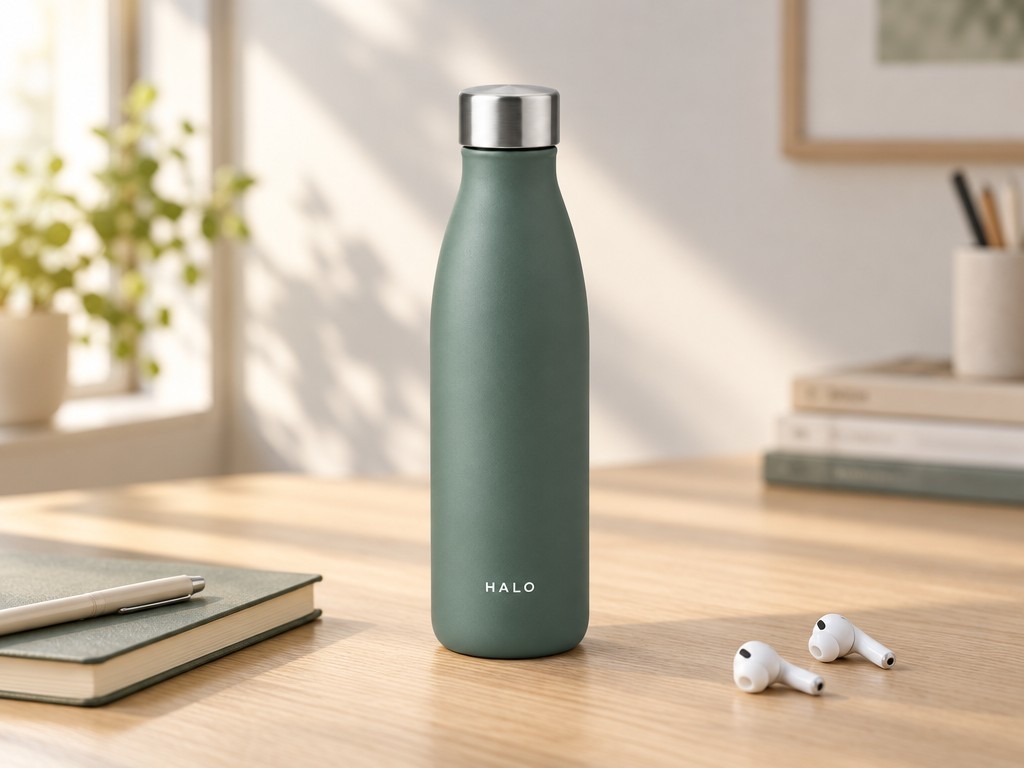
Below are three short prompts — two sentences each — and the image each one produced. Every prompt started from the same reference photo, and only the scene changed.
Three parts, and nothing else:
One photo of your product. Straight-on, on a plain background, whole product in frame. One is enough to start; a second angle makes it stronger.
One sentence that locks the product: Keep the bottle exactly the same. Say it in every prompt.
The scene in plain words: where the product is, what is around it, where the light comes from, and how large the product should be in the frame.
You do not need to describe the camera, the lens, the aperture or the resolution, and you do not need "photorealistic" or "ultra detailed" — those words do not change the result. You also do not need to describe the product itself: it is already in the photo, and describing it again is where wrong shapes and wrong details creep in.

1. Lifestyle scene
Keep the bottle exactly the same. Put it on a light oak desk beside a notebook and a pair of earbuds, morning light coming from the left, the bottle the sharpest thing in the frame.
2. Close-up of the label and the cap
Keep the bottle exactly the same. Close-up of the printed wordmark "HALO", spelled exactly as written, with the brushed steel cap above it, soft light, plain background.

Printed text is the one place where a short prompt needs help: put the exact spelling in quotes. Even then, small text can come out wrong, so check it every time.
3. Flat lay
Keep the bottle exactly the same. Overhead shot: the bottle lying on pale linen with a folded towel and headphones around it, soft daylight, tidy composition.

That is the whole prompt for each image. No camera settings, no lighting diagram, no list of quality words.
Keep the structure and swap the scene sentence for your own product: a candle on a bathroom shelf, a mug beside a kettle, a tote bag on a chair. The pattern does not change.
Multiple products work the same way. Three or five products in one scene is fine — current models hold several products in one image without changing them. Give each product its own reference photo, and make sure every one of them is sharp, clean and well lit. A group shot only looks as good as the weakest reference photo in it.
Prompts set the scene. The model decides how well your product survives it. We ran the same product through the models we recommend and compared the results: which model should you use in 2026?
Change one thing per render. If the background is wrong, change only the background. Do not rewrite the whole prompt.
Fix one area instead of starting over. If everything is right except the label, edit just that part with a mask.
Keep the same reference photo for the whole set. Every image in your listing should be an edit of the same photo, so the product does not drift from shot to shot (how many shots you need).
The label text is spelled correctly.
The shape and proportions match the real product.
The colour and the material match — glass should not look like plastic.
Nothing was invented that you do not sell.
The product is the largest thing in the frame.
One product photo in, a whole listing set out. That's the workflow ExerList runs for you: upload a product photo and it generates the core set of listing images plus SEO-ready copy. Get your first listing free → — 2 free listings, no credit card required.